
Viewing Your LoTW WAZ Account and Applying for WAZ Award Credit
This topic assumes that you've already configured LoTW for use with WAZ awards and linked your LoTW WAZ Award Account to your WAZ record, and explains how to
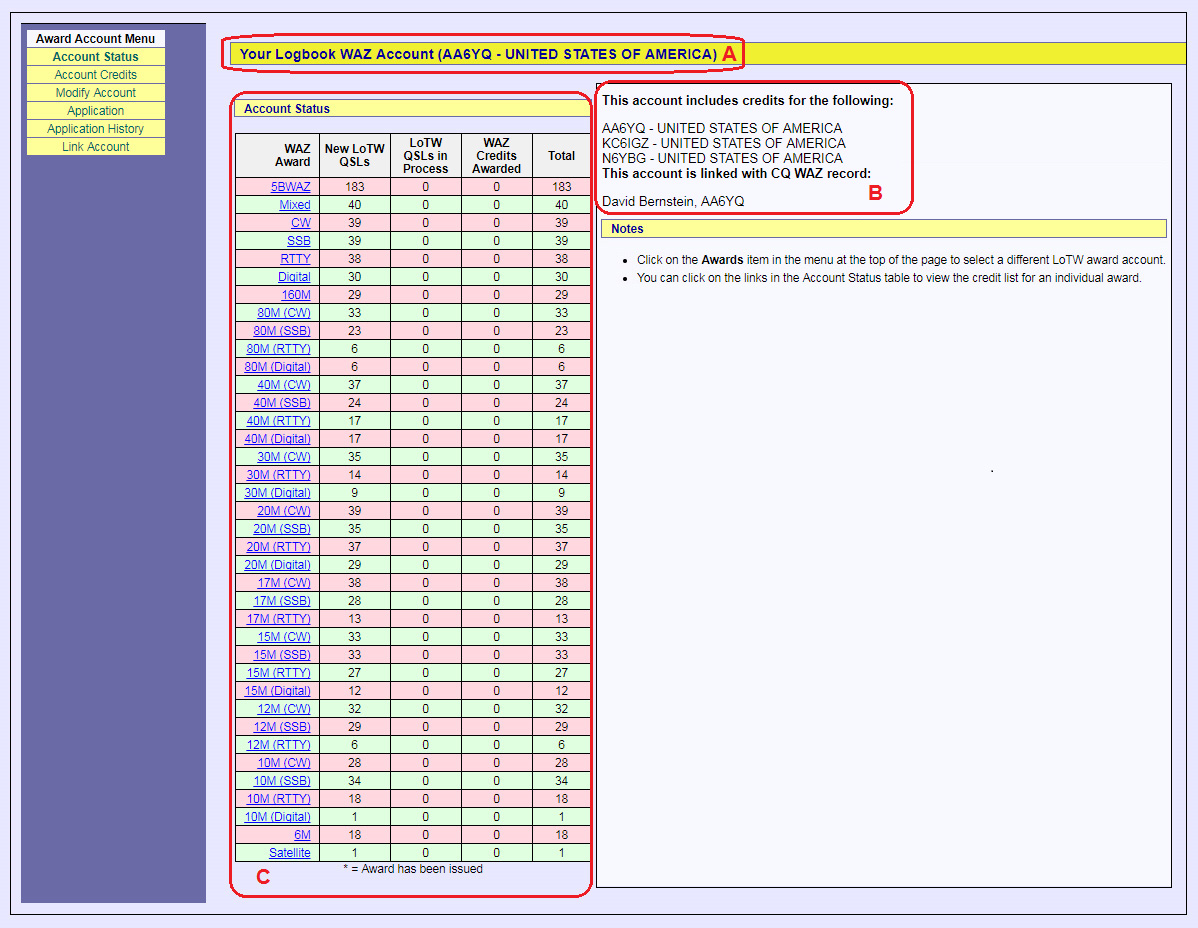
- View an LoTW WAZ Award Account's Status
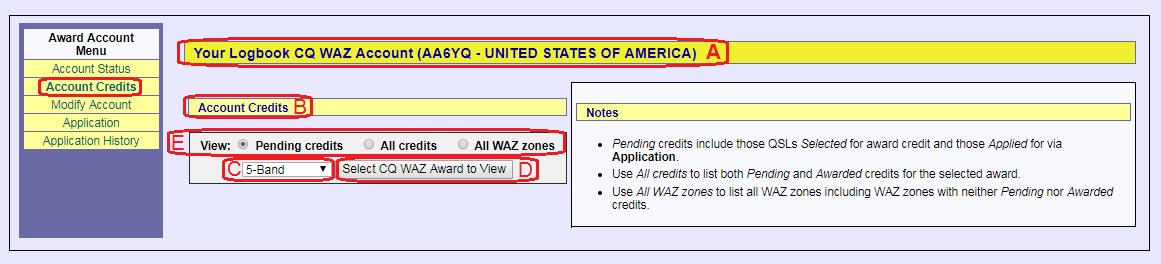
- View Award Credits in the WAZ Record linked to an LoTW WAZ Award Account
- Apply for WAZ Award Credits
- View your WAZ Application History
Notes:
- LoTW cannot be used to confirm mixed-mode QSOs. Confirmation of such QSOs must be accomplished with QSL cards.
- You can view confirmed QSOs with their WAZ Award status
Viewing an LoTW WAZ Award Account's Status
| 1. | Log in to your LoTW Account |
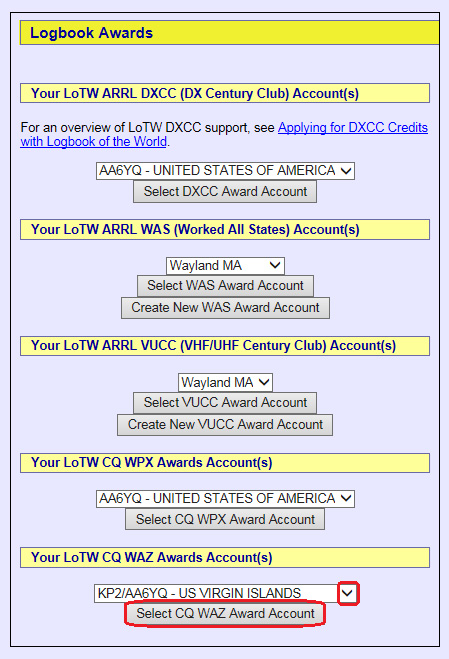
| 2. | Click the Awards tab, and in the Your LoTW ARRL WAZ Accounts section on the left side of the Logbook Awards page, select the WAZ Award Account whose status you wish to view:
|
 |
|
|
Viewing Award Credits in your WAZ Record
You can view WAZ Award Credits granted to QSOs confirmed by LoTW confirmations. If you send email to WAZ award manager John Bergman, KC5LK asking that your CQ WAZ award credits for 5 Band, 160m, 6m, Satellite, or EME WAZ awards be uploaded to LoTW, WAZ Award Credits granted to QSOs confirmed by means other than LoTW will be marked in LoTW as awarded, and displayed with an asterisk.
To view your WAZ Award Credits,
| 1. | Log in to your LoTW Account | ||
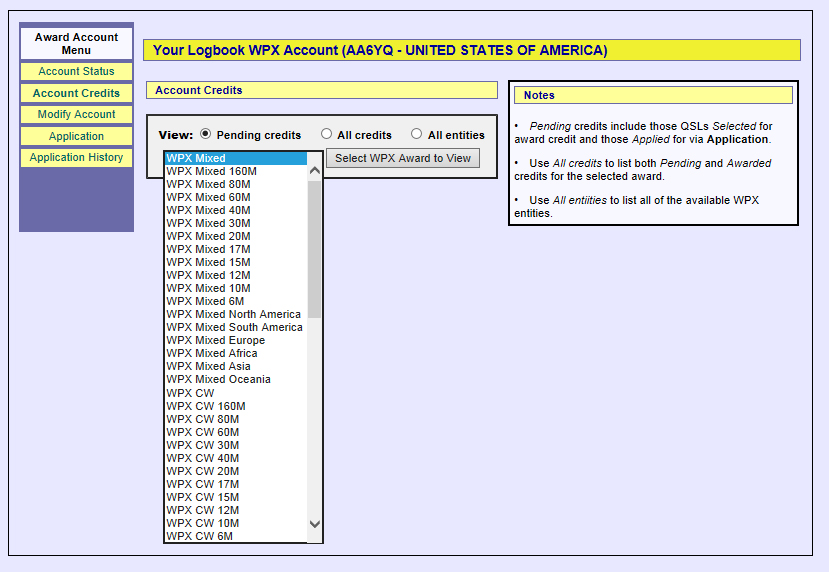
| 2. | Click the Awards tab, and in the Your LoTW ARRL WAZ Accounts section on the left side of theLogbook Awards page, select the WAZ Award Account whose status you wish to view:
|
||
 |
|||
|
|||
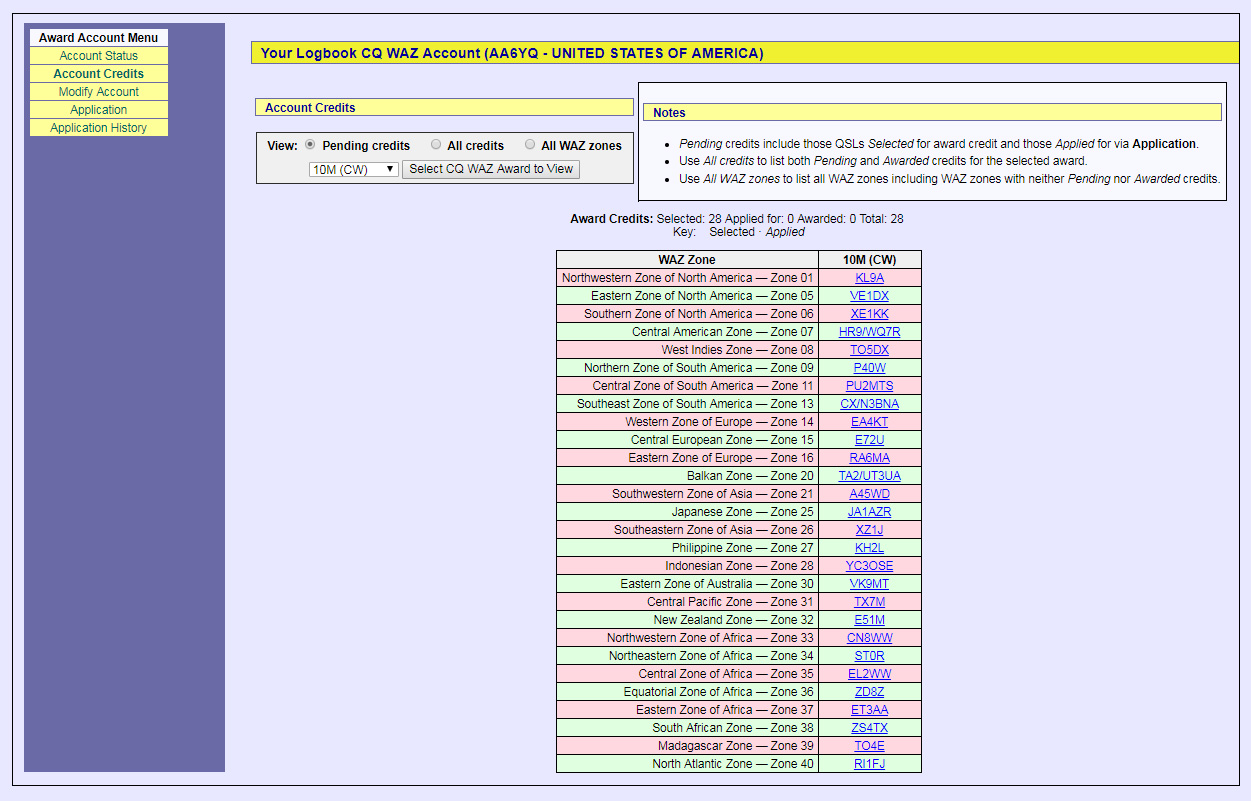
| The screen shot below shows Pending credits for the WAZ 10m CW Award, sorted in CQ Zone order: | |||
 |
|||
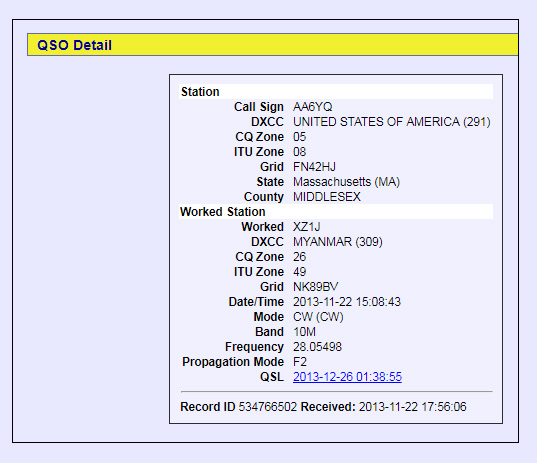
| For each entity on the list, the hyperlinked callsign of your confirmed QSO is displayed. Traversing the hyperlink displays the details of the confirmed QSO: | |||
 |
|||
Applying for WAZ Award Credit
The process of appying for WAZ Award Credit via LoTW is accomplished in two stages:
- optionally adjust LoTW's selection of confirmed QSOs that are candidates for inclusion in a future WAZ application
- submit an application that includes confirmed QSOs for the WAZ awards you are pursuing
When the processing of your application is complete, your LoTW confirmations will be conveyed to the CQ WAZ Award Manager. You can then apply to CQ for awards, placques, or pins.
Fees
- The service fee for conveying LoTW confirmations to the CQ WAZ Award Manager is $8.00 for up to 40 LoTW confirmations conveyed, and $.12 for each additional confirmation conveyed
- CQ requires an application fee for your award, and payment for plaques, pins, postage, etc. See the CQ WAZ web pages for details.
Viewing and Selecting Candidate QSOs
To view QSOs confirmed via LoTW that are currently selected candidates for inclusion in a future WAZ application and (if desired) modify those selections, follow these instructions.
Submitting an Application
| 1. | Log in to your LoTW Account |
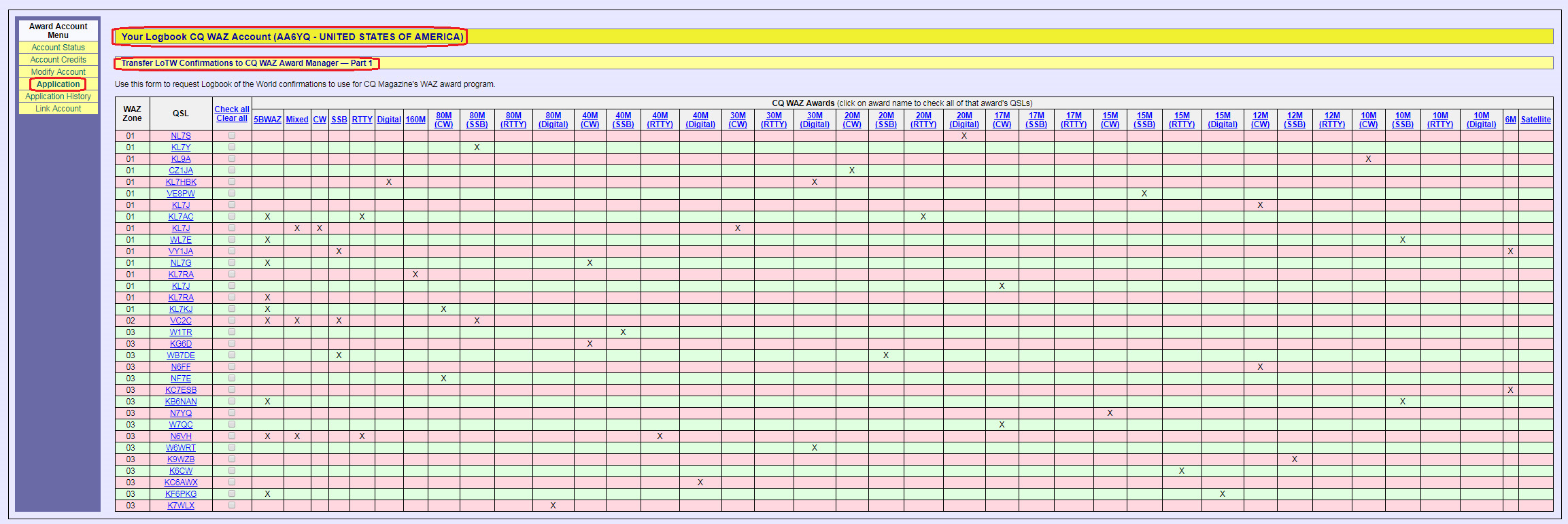
| 2. | Click the Award tab, and in the Your LoTW ARRL WAZ Accounts section on the left side of the Logbook Awards page, select the WAZ Award Account for which you intend to submit an application:
|
 |
|
| 3. | The page shown in the screen shot above displays a table with one row for each QSO confirmed via LoTW that would if submitted advance your WAZ Award progress, and one column for each WAZ award; columns will not appear for any of the 160M, 6M, EME, Satellite or 5-Band WAZ awards that you have already attained. Use your web browser's horizontal and vertical scroll bars to view the entire table:
|
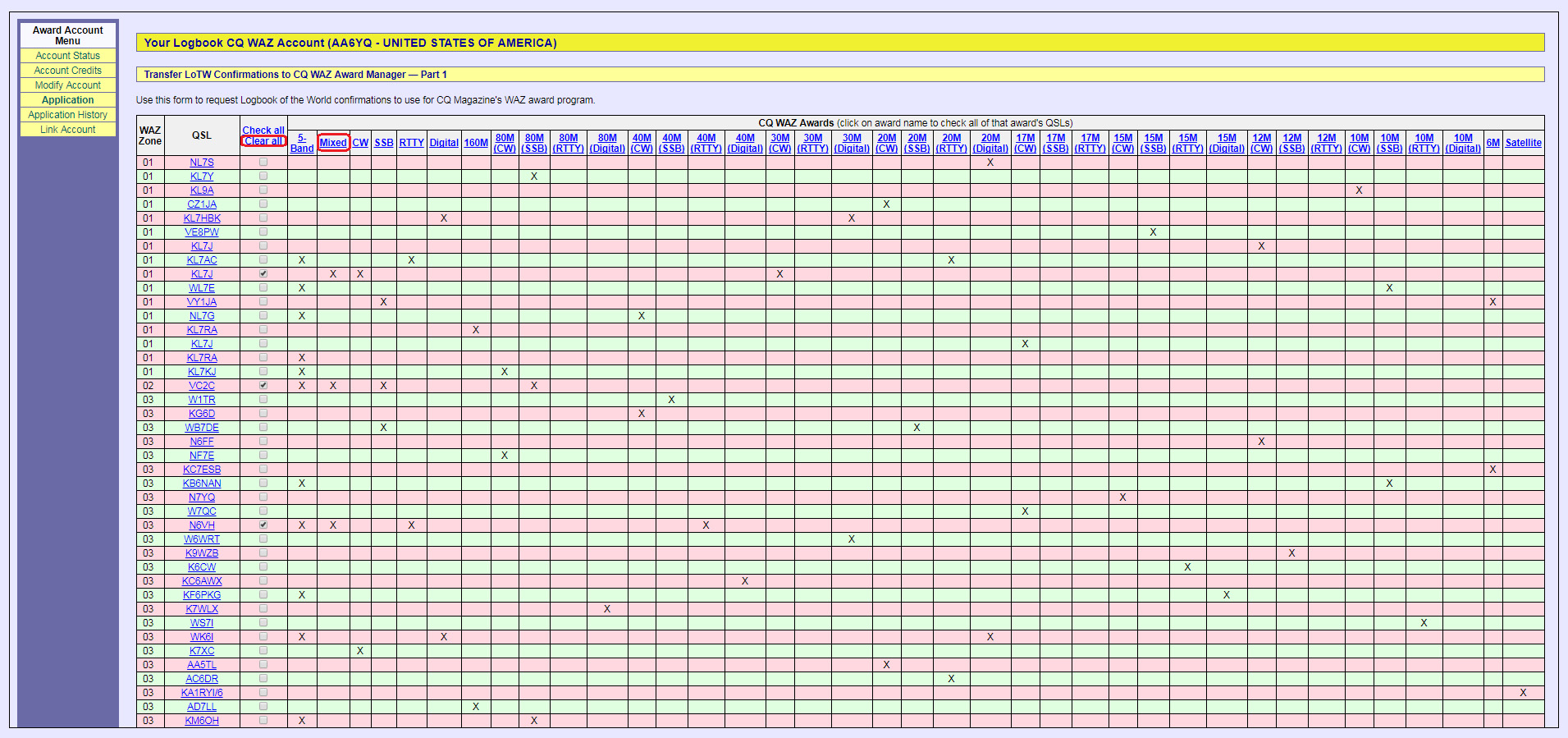
| 4. | In this sample application, we'll submit confirmations needed for the WAZ Mixed award by first clicking the Clear All hyperlink (to remove any previous selections) and then clicking the Mixed hyperlink: |
 |
|
| LoTW will select one confirmed QSO from each CQ zone, checking the box in the third column of each selected QSO. | |
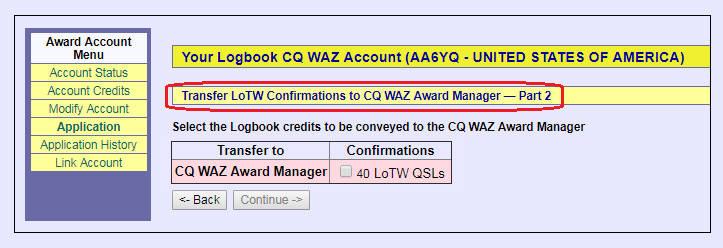
| 5. | Scrolling to the bottom of the web page and clicking the Update and save selections button will record your selections, allowing you to return to this step of the application process later if desired. Clicking the Continue -> button at the bottom of the page displays the Transfer LoTW Confirmations to CQ WAZ Award Manager -- Part 2 page: |
 |
|
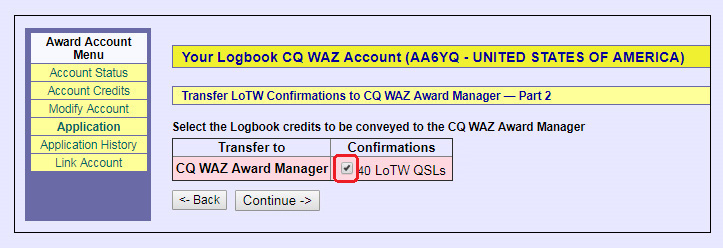
| 6. | In the Confirmations column, check the box to to transfer your LoTW confirmations for the Mixed WAZ award to the CQ WAZ Award Manager: |
 |
|
| This example illustrates an application for one WAZ award; if desired, additional awards could be selected in steps 4, 5, and 6 above. | |
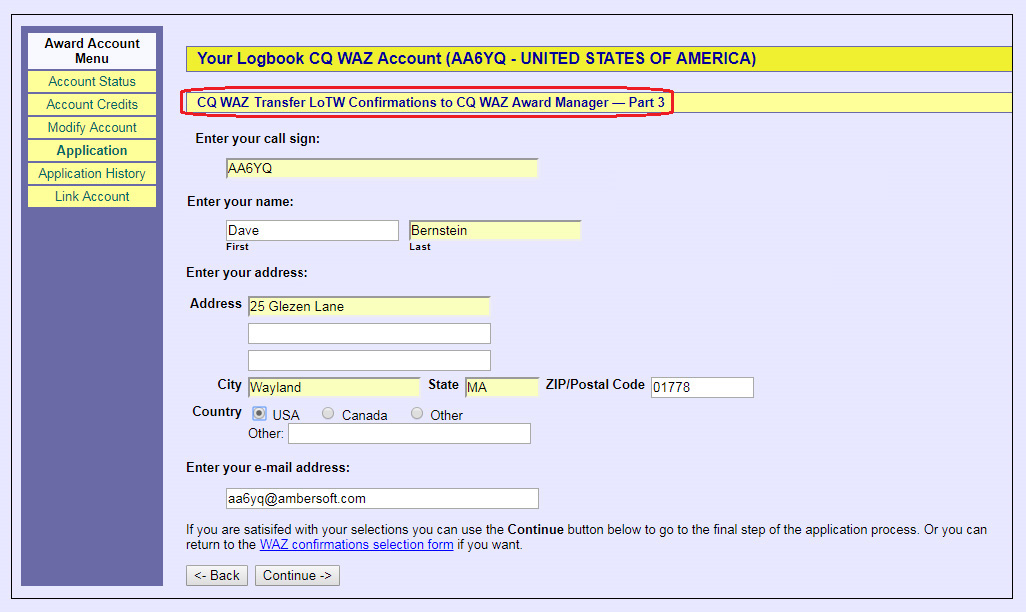
| 7. | Click the Continue -> button at the bottom of the page to display the Transfer LoTW Confirmations to CQ WAZ Award Manager -- Part 3 page: |
 |
|
| 8. | To proceed, fill in any information missing from the above page's textboxes:
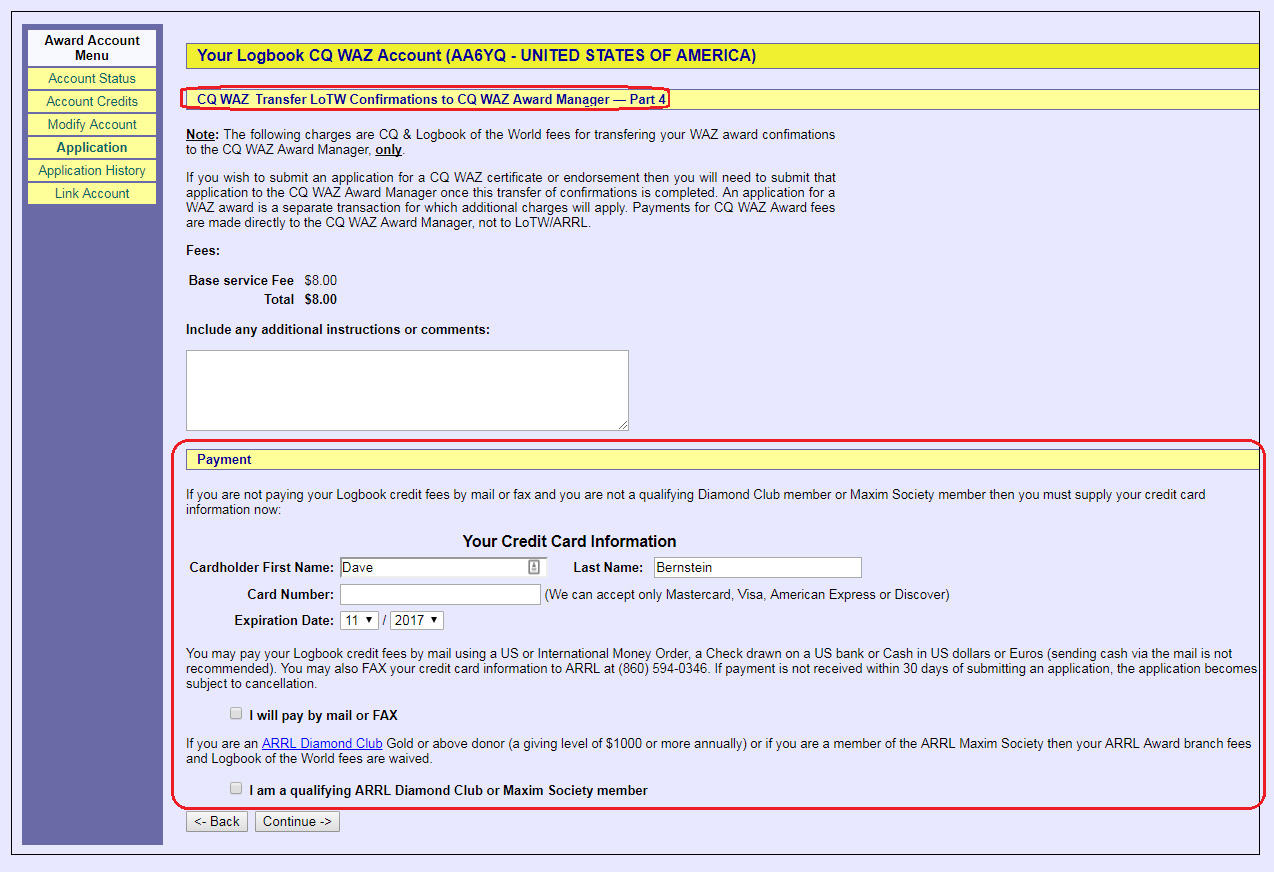
Proceed by clicking the Continue -> button to display the Transfer LoTW Confirmations to CQ WAZ Award Manager -- Part 4 page: |
 |
|
| 9. | The service fee for conveying LoTW confirmations to the CQ WAZ Award Manager is $8.00 for up to 40 LoTW confirmations conveyed, and $.12 for each additional confirmation conveyed. Specify your payment details, and click the Continue button at the bottom of the page; LoTW will display a summary of your application.
CQ requires an application fee for your award, and payment for plaques, pins, postage, etc. Please visit the CQ WAZ web pages for details and complete information about CQ WAZ awards. Please direct any questions to WAZ award manager John Bergman, KC5LK. |
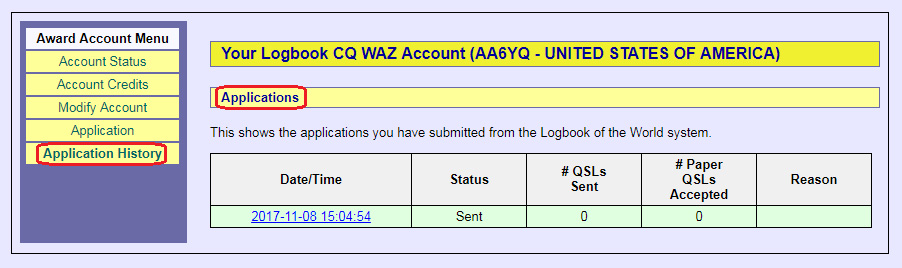
Viewing Your Application History
| 1. | Log in to your LoTW Account |
| 2. | Click the Award tab, and in the Your LoTW ARRL WAZ Accounts section on the left side of theLogbook Awards page, select the WAZ Award Account whose status you wish to view:
|
 |
|
|
Clicking on a hyperlinked Date/Time in the table in the above screen shot will display the details of that application. The # Paper QSLs Accepted and Reason columns are not used. |